
Choose the layout first, not the switch
Mechanical keyboard layouts do more than change the look of a desk. They shape how much room you have for a mouse, how quickly you can reach keys, whether you keep a number pad, and how much retraining your hands will need. If you are comparing mechanical keyboard layouts, the right choice usually comes down to your work style, your available space, and how often you use navigation keys, function keys, or the numpad. gaming keyboard buying factors offers more detail on this point. mechanical keyboard brown switches offers more detail on this point.
The main decision is straightforward: larger layouts give you more dedicated keys and less reliance on shortcuts, while smaller layouts save space and often place your mouse closer to center. That trade-off matters more than many shoppers expect, especially if you type all day, work in spreadsheets, or game with low mouse sensitivity.
Buyer scenario: what each layout suits best
If you are shopping for a mechanical keyboard and do not know where to start, think in terms of use case rather than size alone.
Full-size: for users who still rely on the numpad
A full-size layout includes the main alphanumeric block, function row, navigation cluster, arrow keys, and number pad. This is the most familiar arrangement for office work, data entry, accounting, and anyone who regularly types numbers. The downside is footprint. A full-size board can crowd a smaller desk and push the mouse farther to the side, which some users find less comfortable over long sessions.
Tenkeyless: the common middle ground
Tenkeyless, often shortened to TKL, removes the number pad but keeps the rest of the standard keyboard structure. For many buyers, this is the sweet spot. You keep the function row, navigation keys, and arrow keys while gaining more desk space for mouse movement. TKL is especially appealing if you want a conventional typing experience without the bulk of a full-size board. full-size vs tenkeyless keyboards offers more detail on this point.
75 percent: compact without feeling too sparse
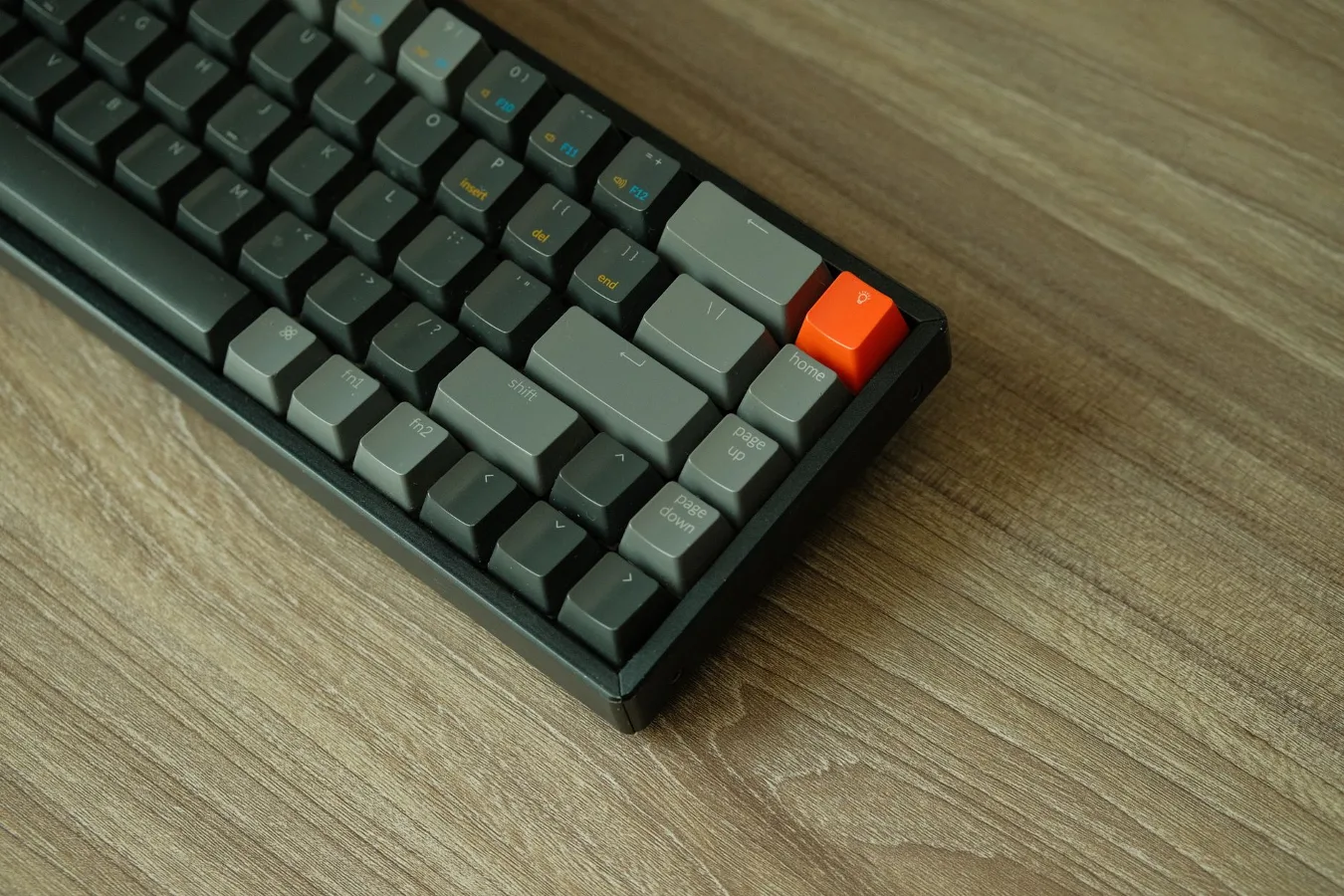
A 75 percent layout condenses the keyboard into a tighter frame while usually keeping the function row, arrow keys, and some navigation keys. It is a popular choice for users who want a smaller footprint but are not ready to give up too many dedicated keys. The trade-off is tighter spacing, which can make the board feel denser and slightly more demanding to learn at first.
65 percent and 60 percent: for portability and minimalism
These compact layouts remove more dedicated keys, often relying on key combinations for function-row access or secondary commands. A 65 percent keyboard usually keeps arrow keys, which makes it easier to live with than a 60 percent board for many people. A 60 percent layout is the most minimal of the common mainstream forms and can be excellent for travel or very small desks, but it requires the most shortcut use and memory.
Trade-offs that matter after the first week
Many buyers focus on the first impression: how clean the board looks, how much desk space it saves, or how satisfying it feels to press the keys. Those are valid factors, but long-term use exposes different priorities.
- Speed versus convenience: smaller layouts can make mouse positioning easier, but they also ask you to remember shortcuts more often.
- Desk space versus desk organization: compact boards open up room for mouse travel, notebooks, and accessories, while larger boards can feel more anchored and complete.
- Consistency versus flexibility: a familiar full-size layout can reduce mistakes, while a compact board may be more adaptable if you customize key layers.
- Learning curve versus simplicity: a 60 percent layout can be elegant, but it is not always the simplest choice for casual users or people who switch between devices frequently.
A common misconception is that smaller automatically means better. In practice, the best layout is the one that fits your habits. If your day is dominated by spreadsheets, a compact board without a numpad can become annoying quickly. If you mostly write, code, browse, or game, a smaller layout may feel liberating.
Material and build factors are tied to layout too
Layout affects more than key count. It often changes the case shape, plate size, and overall stability. Those details influence typing sound, flex, and perceived quality.
Case size and stability
Compact keyboards sometimes feel firmer because there is less unused surface area, but that depends on the case design and internal structure. Larger boards can feel more substantial on the desk, though they may also take up more room than necessary. If you plan to carry the board between home and office, weight and shell durability become part of the decision.
Key spacing and reach
In tighter layouts, keys may be closer together or arranged in denser columns. That can be efficient once learned, but it may frustrate users with larger hands or those moving from a standard office keyboard. The shift is especially noticeable with 65 percent and smaller boards, where navigation and function access move behind layers.
Plate and switch feel
The same switch can feel different depending on the board’s layout and structure. Shorter boards may reduce hand movement and make typing feel brisker, while larger layouts can feel more traditional. If you care about sound or typing feel, layout should be considered alongside plate material, mounting style, and keycap profile, not separately.
Compatibility and workflow considerations
The layout you choose should match the tasks you do most often, not the ones you do occasionally. That is where many shoppers make avoidable mistakes.
Spreadsheet and finance work
If you enter numbers constantly, a dedicated numpad is still hard to beat. Some users compromise with a separate numeric keypad instead of choosing a full-size keyboard. That setup can preserve desk space while keeping number entry available only when needed.
Writing, coding, and general productivity
For typing-heavy work that does not depend on the numpad, tenkeyless and 75 percent layouts are often easier to live with than full-size boards. They maintain more familiar navigation than ultra-compact layouts, which can matter if you use home/end, page up/down, and arrow keys throughout the day.
Gaming
Gamers often gravitate toward TKL, 75 percent, or 60 percent boards because the smaller footprint leaves more room for mouse movement. That can be helpful for lower sensitivity settings and wider sweeps. Still, if you rely on function keys for hotkeys, macros, or streaming controls, removing dedicated keys may slow you down unless the board offers good layer support or programmable shortcuts.
Multi-device and travel use
If you move between a laptop, desktop, and portable setup, compact layouts can simplify packing. A 65 percent keyboard is often easier to slip into a bag, and wireless options can make temporary setups less cluttered. The trade-off is that frequent switching between layouts can make it harder to keep your muscle memory consistent.
Hidden constraints that affect satisfaction
Some considerations do not get enough attention until after purchase.
- Key layer quality: compact layouts depend on layers for function-row and navigation access. If the firmware or software is awkward, the keyboard can feel less efficient than the size suggests.
- Keycap availability: unusual layouts sometimes use nonstandard key sizes or staggered positions, which can make replacements and custom sets harder to match.
- Shortcut dependence: if you dislike chorded shortcuts or forget them easily, a very compact board may create friction.
- Shared use: if other people use your keyboard, a standard full-size or TKL layout is easier for them to understand immediately.
- Accessory fit: wrist rests, desk mats, and keyboard trays may suit certain layouts better than others.
An overlooked factor is how often you alternate between keyboard and mouse. The more mouse-driven your workflow, the more a smaller layout can help by bringing the mouse closer to center. If you barely use the mouse and mostly type, layout compactness may matter less than comfort, sound, and key feel.
How to narrow the choice without overthinking it
If you are comparing mechanical keyboard layouts for the first time, a simple decision path can help.
- Start with the number pad question. If you use it regularly, choose full-size or add a separate numpad.
- Decide how much you want to memorize. If you dislike layers, avoid the most compact boards.
- Measure your desk space. Pay attention to mouse clearance, not just keyboard width.
- Think about portability. If the keyboard will travel, smaller is easier to carry.
- Check your daily shortcuts. If you live in function keys, arrows, or navigation commands, make sure the layout keeps them accessible.
This approach keeps the decision practical. Instead of chasing the most popular format, you can choose the layout that fits your routines and reduces friction.
Popular layout types at a glance
| Layout | Main strengths | Main compromises | Best fit |
|---|---|---|---|
| Full-size | Dedicated numpad, familiar arrangement, easy for shared use | Largest footprint, less mouse room | Data entry, office work, users who want everything on one board |
| Tenkeyless | Balanced size, keeps most standard keys, more desk space | No numpad | General productivity, mixed use, many gaming setups |
| 75 percent | Compact but practical, often retains arrows and function row | Tighter spacing, layout varies by brand | Users who want smaller size without going ultra-minimal |
| 65 percent | Portable, keeps arrow keys, clean desktop footprint | More layer reliance than 75 percent | Travel, smaller desks, minimal setups |
| 60 percent | Very compact, highly portable, popular in custom scenes | Most shortcut dependence, steeper learning curve | Experienced users, minimal desks, enthusiasts |
What to do next
The best mechanical keyboard layout is the one that matches your daily habits with the least compromise. If you want the easiest transition, full-size and tenkeyless are the safest starting points. If desk space or portability matters more, 75 percent and 65 percent boards are often the most sensible balance. If you enjoy a streamlined setup and do not mind learning layers, a 60 percent keyboard can be rewarding, but only for the right user.
Before you buy, look beyond the layout name alone. Check whether the board keeps the keys you use most, whether the software supports the shortcuts you need, and whether the case shape, key spacing, and mounting style suit your setup. That is where a keyboard stops being just a size choice and starts becoming a better tool for your work.
